
How to Track AI Traffic in Google Analytics 4: A Founder's Guide to Seeing ChatGPT, Claude, Perplexity, and Gemini
2026-06-11I spent a good chunk of my career advising some of the most recognizable brands on the planet about where their traffic came from and what to do about it. So believe me when I tell you that something big has shifted. People are no longer only typing questions into a search box. They are asking ChatGPT, Claude, Perplexity, and Gemini, and a growing slice of those conversations end with someone clicking through to a real website. Maybe yours.
Here is the uncomfortable part. Most founders have no idea how much of that is already happening, because Google Analytics 4 does not hand it to you on a plate. The visits are in there. They are just scattered and mislabeled. Today I am going to show you how to pull them into the light.
Why you cannot see AI traffic by default
When someone arrives from an AI tool, GA4 records a source and a medium for that session, the same way it does for Google, a newsletter, or a friend texting you a link. The trouble is that AI referrals show up under a pile of different source names. Some come through as chatgpt.com, some as perplexity.ai, some get bucketed as referral, and some, depending on how the link was opened, slip into direct traffic where they are basically invisible.
So out of the box, your AI traffic is real but fragmented. You will never notice it by glancing at a standard report. You have to go looking for it on purpose. The good news is that it takes about five minutes and zero budget.
The five minute setup
Here is the cleanest way to do it inside GA4.
- Log into your Google Analytics 4 property.
- In the left menu, go to Reports, then Acquisition, then Traffic acquisition.
- Above the report table, click Add filter or the small plus icon to add a comparison or filter.
- Choose Session source / medium as the dimension you want to filter on.
- Set the match type to Matches regex. This is the key move. Regex lets you catch a whole list of AI sources in one shot instead of adding them one by one.
- Paste in a regex pattern that covers the major AI platforms.
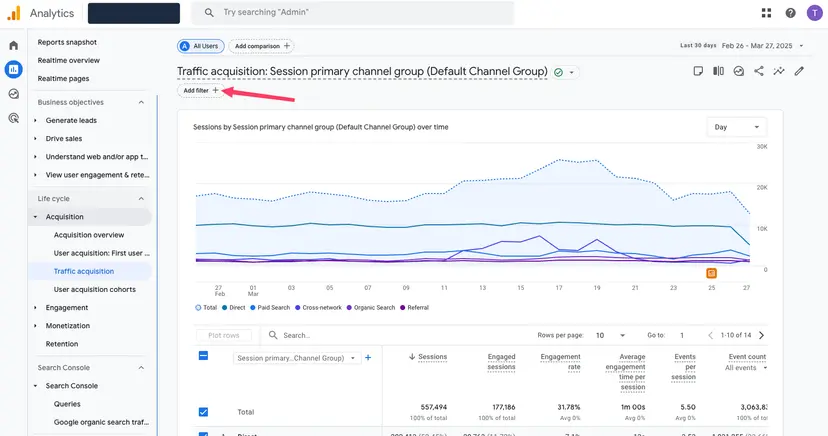
Here is a clean, current pattern you can use as a starting point. It catches the big players and their common variations.
.*chatgpt.*|.*openai.*|.*claude.*|.*anthropic.*|.*perplexity.*|.*gemini.*|.*bard.*|.*copilot.*|.*bing.*chat.*|.*you\.com.*|.*poe\.com.*|.*deepseek.*|.*grok.*
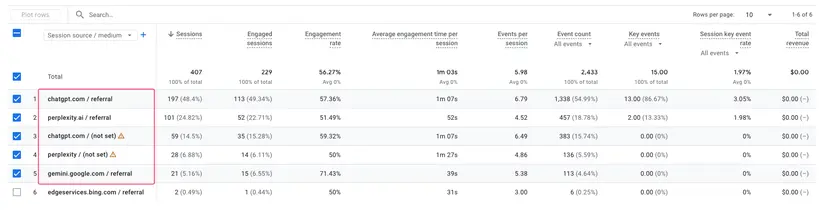
Apply it, and your report will redraw to show only the sessions that came from AI tools. That number is almost always bigger than founders expect, and the trend line over time is the part that really tells the story.
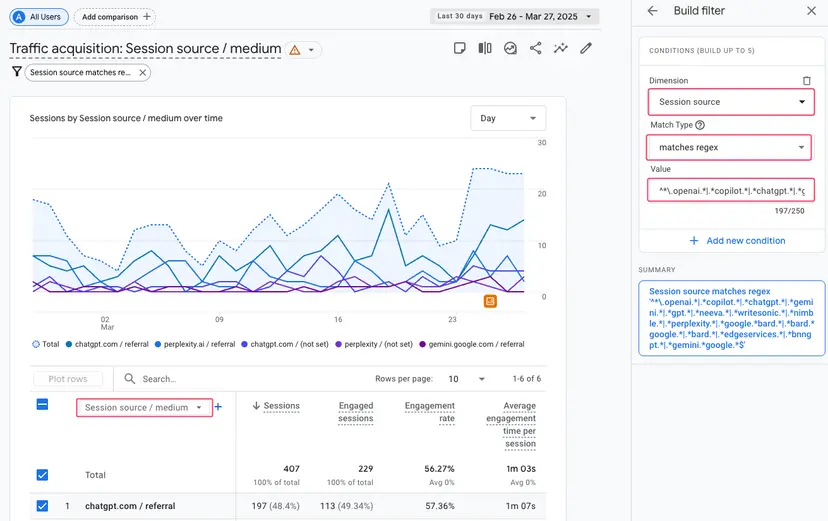
Read the regex like a human
You do not need to be an engineer to maintain this, but it helps to understand what you are looking at, because you will want to update it as new tools appear.
- The dots and asterisks are wildcards.
.*chatgpt.*simply means "match any source name that contains the word chatgpt anywhere in it." - The pipe symbol is an "or." Each chunk between pipes is another AI source you want to catch.
- When a tool name has a dot in the actual domain, like you.com, you escape it with a backslash so the dot is treated as a literal dot rather than a wildcard.
That is the whole trick. As the landscape changes, and it changes fast, you just add another chunk with a pipe in front of it.
What to actually do with the data
Surfacing the number is step one. Being a smart operator about it is step two. Here is what I would look at.
- Volume and trend. Is AI traffic growing month over month. That single line is the clearest signal of whether your content is being surfaced and cited inside AI answers.
- Which platforms. ChatGPT, Perplexity, and Gemini behave differently and cite differently. Knowing where your visitors come from tells you where to focus.
- Behavior once they land. Compare AI visitors against your traditional organic visitors. Do they stick around. Do they convert. AI traffic is often high intent because the tool already pre qualified the person before sending them to you.
- Which pages get cited. Cross reference your AI traffic with your landing page report to learn what kind of content AI tools actually pull from. Then make more of that.
Save this as a custom report or a comparison so you are not rebuilding the filter every week. Future you will be grateful.
A note on the bigger picture
This whole exercise has a name now. The discipline of getting your content surfaced and cited inside AI answers is being called Generative Engine Optimization, or GEO, and its cousin, Answer Engine Optimization. It is the natural evolution of the SEO work I have been doing for fifteen years. The fundamentals have not changed as much as people think. Clear, genuinely useful, well structured content is still what gets rewarded. The difference is that the audience now includes a machine that reads your page and decides whether to recommend you.
Measuring AI traffic in GA4 is how you close the loop. You publish, the AI tools cite you, visitors arrive, and now you can finally see it and double down on what works. You cannot improve what you cannot see, and until you set up this filter, you have been flying blind on a channel that is only getting bigger.
If you want a hand building out a content and GEO strategy that actually shows up in these reports, that is exactly the kind of thing we do at Cause of a Kind. We help cool people build great products, and then we help the world find them.